VCF DSM or VMware Data Service Manager 2.1 and 2.1.1 release includes the following new features and improvements.
Easy installation process: DSM 2.1 Installer OVA is bundled with database templates. These templates remove the requirement of S3 object storage for DSM installation. However, S3 Object Storage is still required for backups and logs.
DSM 2.1 improved alerting for easy troubleshooting
Improved Certificate Management
Notable Database management improvements: MySQL now supports stand-alone and 3 Nodes Cluster Deployments, LDAP Authentication for Databases.
VMware released new version of DSM 2.0.3 on 6th May 2024, there is architectural changes in this release compare to previous version 1.x. detailed changes refer the VMware Data Service Manager release notes 2.0.
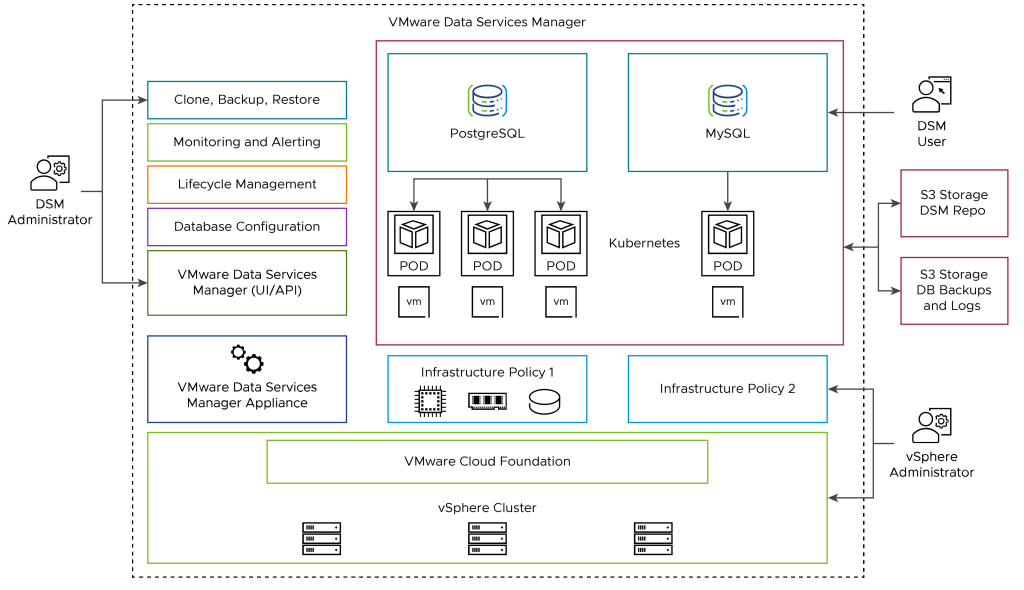
VMware Data Service Manager provides modern database and data services management for VMware vSphere. DSM Provides a data-as-a-service (DaaS) toolset for on-demand provisioning and automated management of PostgreSQL, MySQL databases in vSphere/VCF environment.
VMware Data Service Manager Appliance – An Virtual appliance deployed in the vSphere Data Center, Machine, it is also called DSM Provider VM.
Infrastructure Policy – Defines the Compute, Storage and network resources for the database to be deployed.
DSM Console – User Interface that DSM Administrator and Users can access to create database or data services and perform the life cycle management operations of the data services.
Database VM – An Ubuntu virtual machine that hosts a data service created by a Data service Manager User. VMWare DSM2.0 currently supports Provisioning of MySQL, PostgreSQL databases.
Database Topology – the DSM user can specify database topology. Depending on the topology, the database can be replicated (Clustered) or standalone.
VMWare Data Service Manager User Roles: There are Three type of Primary user roles in DSM 2.0
AvSphere administrator deploys and monitors VMware Data Services Manager Appliance, plans, administers, and secures resources for databases by creating and managing infrastructure policies, and monitors database VMs.
A DSM administrator performs tasks that include managing VMware Data Services Manager settings and users, changing database ownership, and so on.
A user in the DSM user role typically provisions and manages databases and performs database lifecycle operations. Refer the VMware document to understand the detailed DSM 2.0 User roles and responsibilities.
 SK ITPro