Part-2, VCF DSM 2.1.1, In this recording will cover the Installation and Basic configuration of DSM 2.1.1 Release.
The following steps are covered in this video: 1. Instatllion of DSM appliance using vCenter UI 2. DSM vCenter client plugin registration 3. Creation of DSM IT Policy using vCetner console (IT Policy, IP Pools, VM Class) 4. DSM User Permission and DSM Local user account creations (DSM Admin and DSM users account) 5. Active Directory Service integration with DSM (Import AD trusted root certificate) 6. Active Directory User Groups settings 7. Verification of DSM RBAC using both DSM users and AD users accounts. 8. Enable Data Services templates for MySQL and Postgres 9. Create or Provision PostgreSQL standalone instance 10. Connect to Postgres database instance using pgAdmin.
VMware released new version of DSM 2.0.3 on 6th May 2024, there is architectural changes in this release compare to previous version 1.x. detailed changes refer the VMware Data Service Manager release notes 2.0.
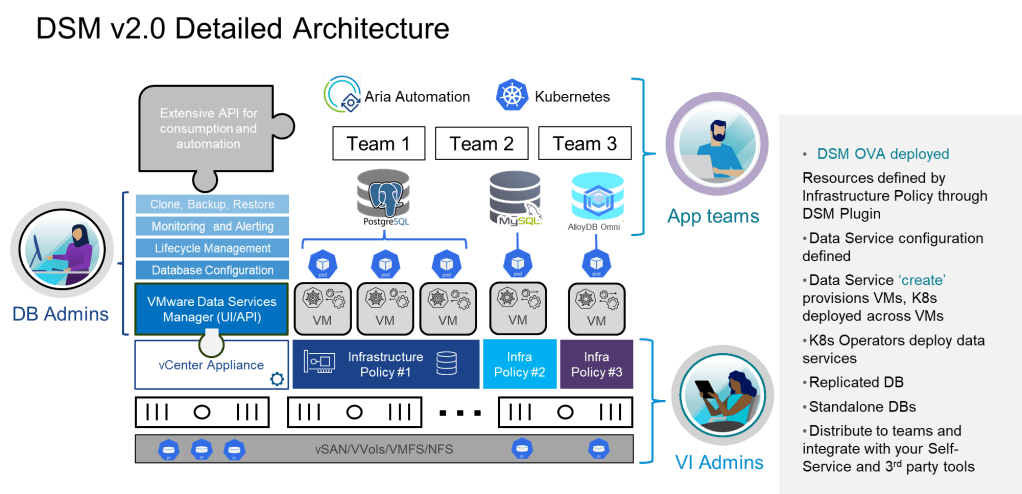
VMware Data Service Manager provides modern database and data services management for VMware vSphere. DSM Provides a data-as-a-service (DaaS) toolset for on-demand provisioning and automated management of PostgreSQL, MySQL databases in vSphere/VCF environment.
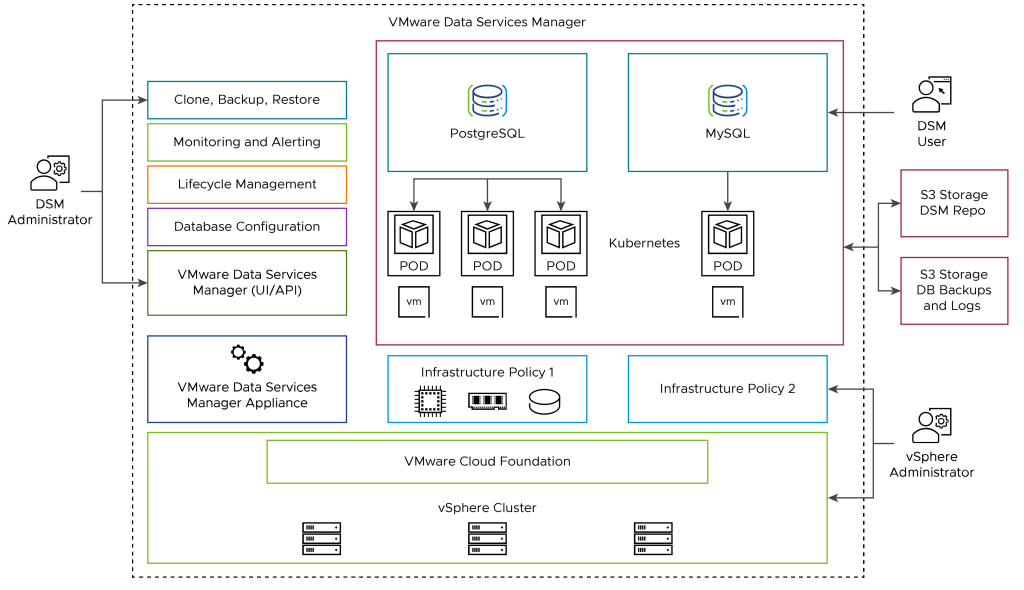
VMware Data Service Manager Appliance – An Virtual appliance deployed in the vSphere Data Center, Machine, it is also called DSM Provider VM.
Infrastructure Policy – Defines the Compute, Storage and network resources for the database to be deployed.
DSM Console – User Interface that DSM Administrator and Users can access to create database or data services and perform the life cycle management operations of the data services.
Database VM – An Ubuntu virtual machine that hosts a data service created by a Data service Manager User. VMWare DSM2.0 currently supports Provisioning of MySQL, PostgreSQL databases.
Database Topology – the DSM user can specify database topology. Depending on the topology, the database can be replicated (Clustered) or standalone.
VMWare Data Service Manager User Roles: There are Three type of Primary user roles in DSM 2.0
AvSphere administrator deploys and monitors VMware Data Services Manager Appliance, plans, administers, and secures resources for databases by creating and managing infrastructure policies, and monitors database VMs.
A DSM administrator performs tasks that include managing VMware Data Services Manager settings and users, changing database ownership, and so on.
A user in the DSM user role typically provisions and manages databases and performs database lifecycle operations. Refer the VMware document to understand the detailed DSM 2.0 User roles and responsibilities.
 SK ITPro