VCF DSM or VMware Data Service Manager 2.1 and 2.1.1 release includes the following new features and improvements.
Easy installation process: DSM 2.1 Installer OVA is bundled with database templates. These templates remove the requirement of S3 object storage for DSM installation. However, S3 Object Storage is still required for backups and logs.
DSM 2.1 improved alerting for easy troubleshooting
Improved Certificate Management
Notable Database management improvements: MySQL now supports stand-alone and 3 Nodes Cluster Deployments, LDAP Authentication for Databases.
In this blog post, I would like to share the recent SRM 8.7 to 9.0.2 Upgrade experience. VMware Site Recovery Manager Upgrade from 8.7 to 9.0.1. the SRM upgrade completed successfully but the SRM client plug-in for vCenter shows in failed status.
We raised the GSS support case. We understand from the support Engineer that this issue has been reported as known issues with SRM 9.01 version when you have vCenter 7.0.3 environment. Reference: KB No. 372690.
The above KB mentioned that SRM & VRMS 9.0.1 plug-in is not compatible with vCenter 7.0.3 but works fine with vCenter 8.0.2. Note: SRM functionalities are not affected. The only issue is that users can’t launch the SRM UI from vCenter Server. Nevertheless, the admin user can access the SRM UI directly by accessing SRM or VRMS URLs at https://srmfqdn/dr or https://vrmsfqdn/dr.
GSS suggested the proposed feasible options: 1. Upgrade the vCenter Version from 7.0.3x to 8.0.2 2. Upgrade the SRM version from 8.7 to SRM 9.0 3. Upgrade the SRM version from 8.7 to SRM 9.0.2 4. Upgrade the SRM version 9.0.1 to 9.0.2 5. Use the interim fix, to access SRM UI you will need to access it via the link at https://srmfqdn/dr or https://vrmsfqdn/dr
In our case, we can’t select Choice No.1. It is a production environment. It requires another CR to upgrade the vCenter version. We have opted for the choice nos. 4. Upgrade the SRM version 9.0.1 to 9.0.2 which is a suitable resolution. Choice No. 4 also we have encountered the issues that “Operation Failed”, Failed to install update: Unknown error 243.
We have referred to this KB Nos.372249 and installed this patch ‘dr-configurator-9.0.1-76796489.x86_64.rpm‘ to resolve the upgrade installation issue. After installing the patch as per the steps mentioned in the KB372249. The SRM Upgrade from 9.0.1 to 9.0.2 completed successfully.
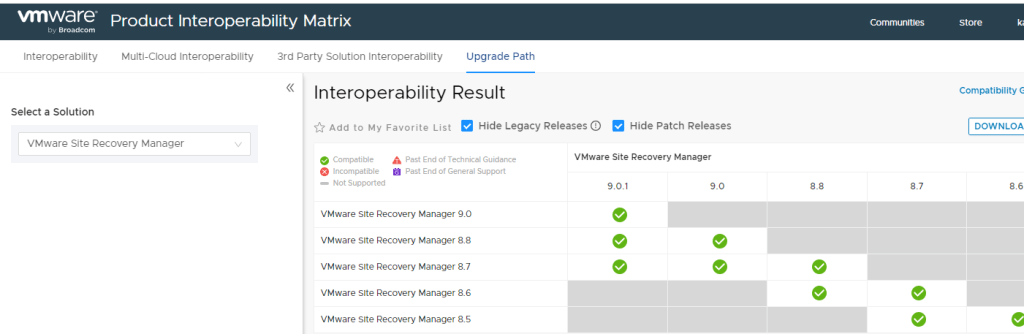
Another caveats is the VMware upgrade path does not shows the SRM 9.0.2 since the product name has been changed as VMware Live Site Recovery (VLSR). VMWare Site Recovery Manager Upgrade Path:





 SK ITPro